
How Ceros Gives Security Teams Visibility and Control in Claude Code
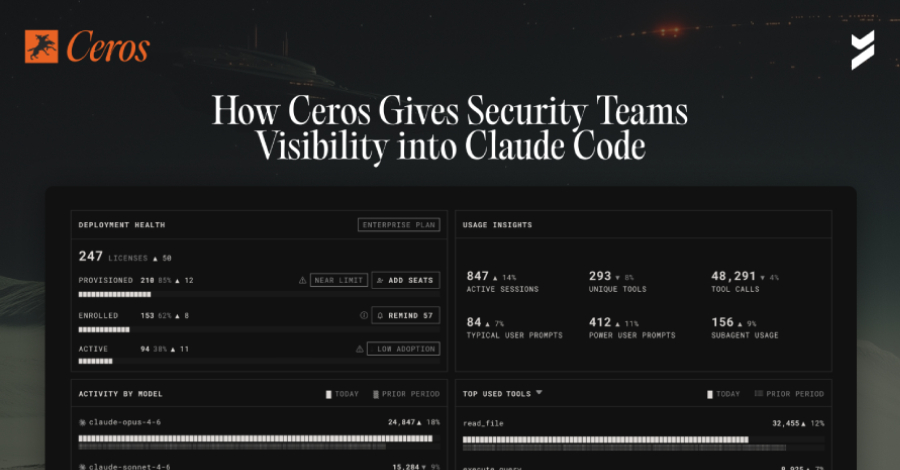
Security teams have spent years building identity and access controls for human users and service accounts. But a new category of actor has quietly entered most enterprise environments, and it operates entirely outside those controls.
Claude Code, Anthropic’s AI coding agent, is now running across engineering organizations at scale. It reads files, executes shell commands, calls external APIs, and connects to third-party integrations called MCP servers. It does all of this autonomously, with the full permissions of the developer who launched it, on the developer’s local machine, before any network-layer security tool can see it. It leaves no audit trail that the existing security infrastructure was built to capture.
This walkthrough covers Ceros, an AI Trust Layer built by Beyond Identity that sits directly on the developer’s machine alongside Claude Code and provides real-time visibility, runtime policy enforcement, and a cryptographic audit trail of every action the agent takes.
The Problem: Claude Code Operates Outside Existing Security Controls
Before walking through the product, it helps to understand why existing tools cannot address this problem.
Most enterprise security tooling sits at the network edge or the API gateway. These tools see traffic after it leaves the machine. By the time a SIEM ingests an event or a network monitor flags unusual traffic, Claude Code has already acted: the file has already been read, the shell command has already executed, and the data has already moved.
Claude Code’s behavioral profile compounds this problem significantly. It lives off the land, using tools and permissions already on the developer’s machine rather than bringing its own. It communicates through external model calls that look like normal traffic. It executes complex sequences of actions that no human explicitly programmed. And it runs with the full inherited permissions of whoever launched it, including access to credentials, production systems, and sensitive data that developers happen to have on their machine.
The result is a gap that network-layer tools structurally cannot close: everything Claude Code does on the local machine, before any request leaves the device. That is where Ceros operates.
Getting Started: Two Commands, Thirty Seconds
Ceros is designed so that installation does not disrupt developer workflow. Setup requires two commands:
curl -fsSL https://agent.beyondidentity.com/install.sh | bash
ceros claude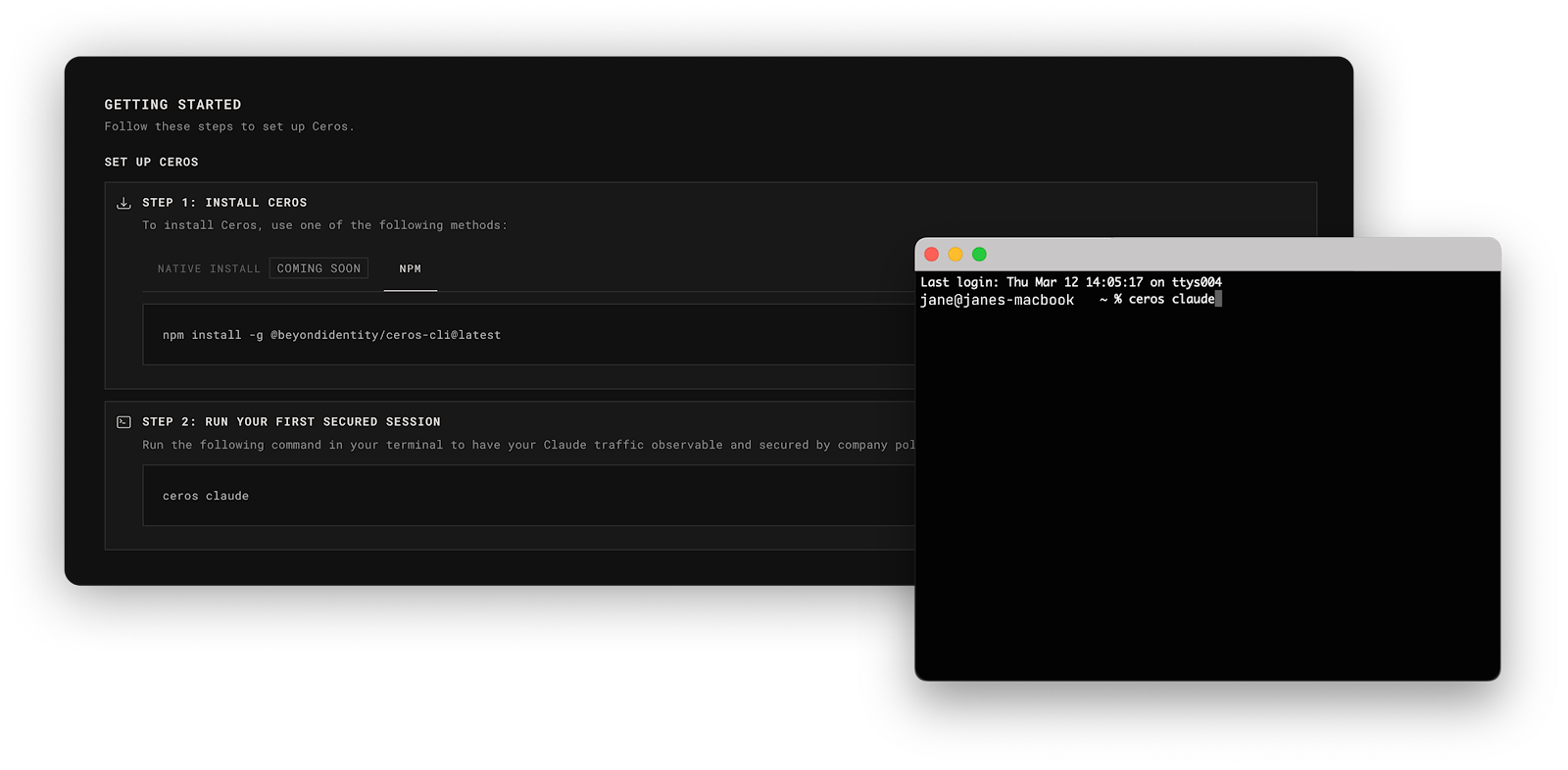
The first command installs the CLI. The second launches Claude Code through Ceros. A browser window opens, prompts for an email address, and sends a six-digit verification code. After entering the code, Claude Code starts up and works exactly as it did before. From the developer’s perspective, nothing has changed.
For organization-wide rollouts, administrators can configure Ceros so that developers are prompted to enroll automatically when they launch Claude Code. Security becomes invisible to the developer, which is the only way security actually gets adopted at scale.
Once enrolled, before Claude Code generates a single token, Ceros captures full device context, including OS, kernel version, disk encryption status, Secure Boot state, and endpoint protection status, all in under 250 milliseconds. It captures the complete process ancestry of how Claude Code was invoked, with binary hashes of every executable in the chain. And it ties the session to a verified human identity through Beyond Identity’s platform, signed with a hardware-bound cryptographic key.
The Console: See What Claude Code Has Actually Been Doing
After enrolling a device and running Claude Code normally for a few days, navigating to the Ceros admin console reveals something most security teams have never seen before: a complete record of what Claude Code has actually been doing across their environment.
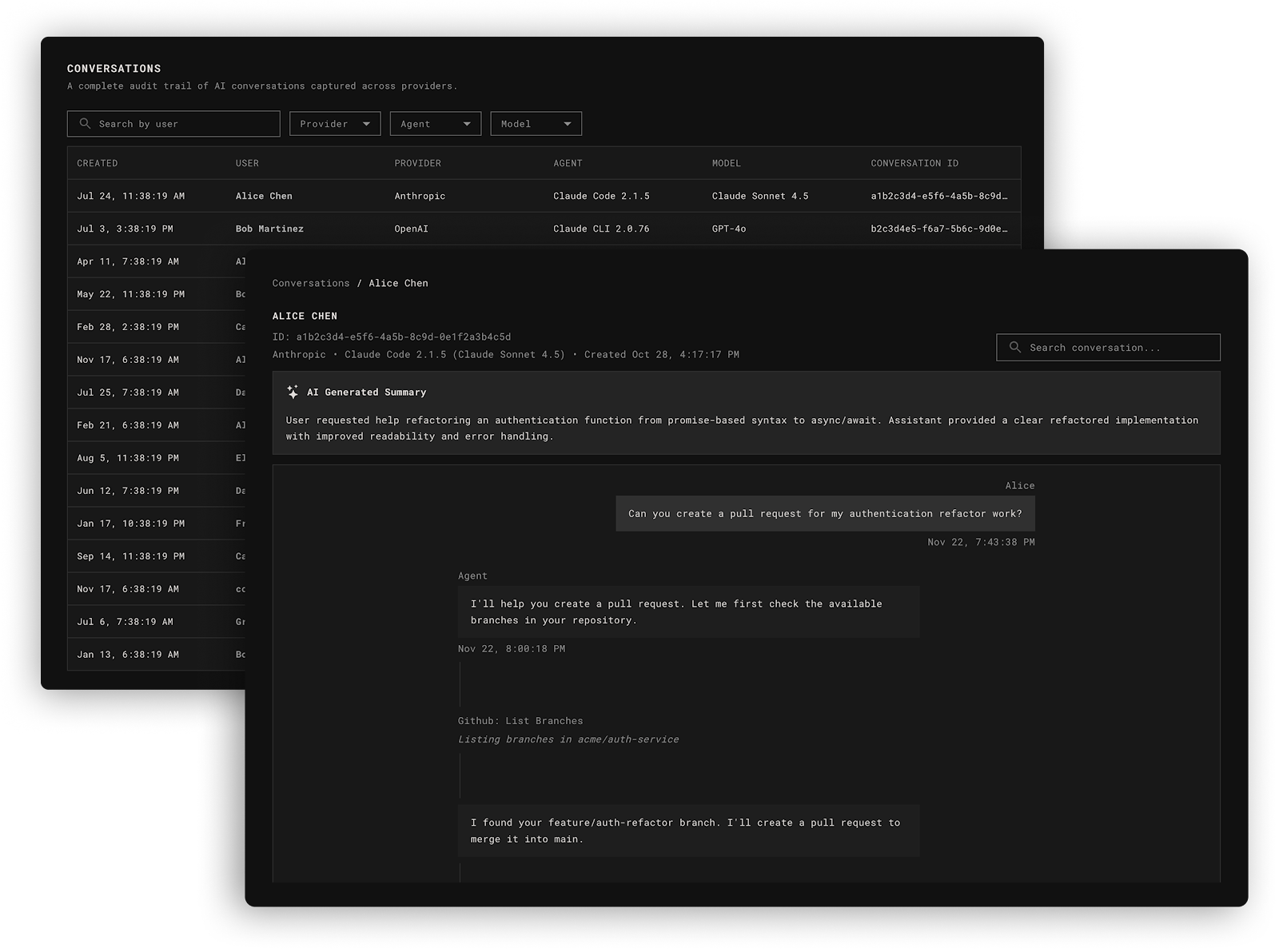
The Conversations view shows every session between a developer and Claude Code across all enrolled devices, listed by user, device, and timestamp. Clicking into any conversation shows the full back-and-forth between the developer and the agent. But between the prompts and responses, something else is visible: tool calls.
When a developer asks Claude Code something as simple as “what files are in my directory?”, the LLM does not simply know the answer. It instructs the agent to execute a tool on the local machine, in this case bash ls -la. That shell command runs on the developer’s device with the developer’s permissions. One casual question triggers real execution on a real machine.
The Conversations view surfaces every one of these tool invocations across every session. For most security teams, this is the first time they have seen this data.
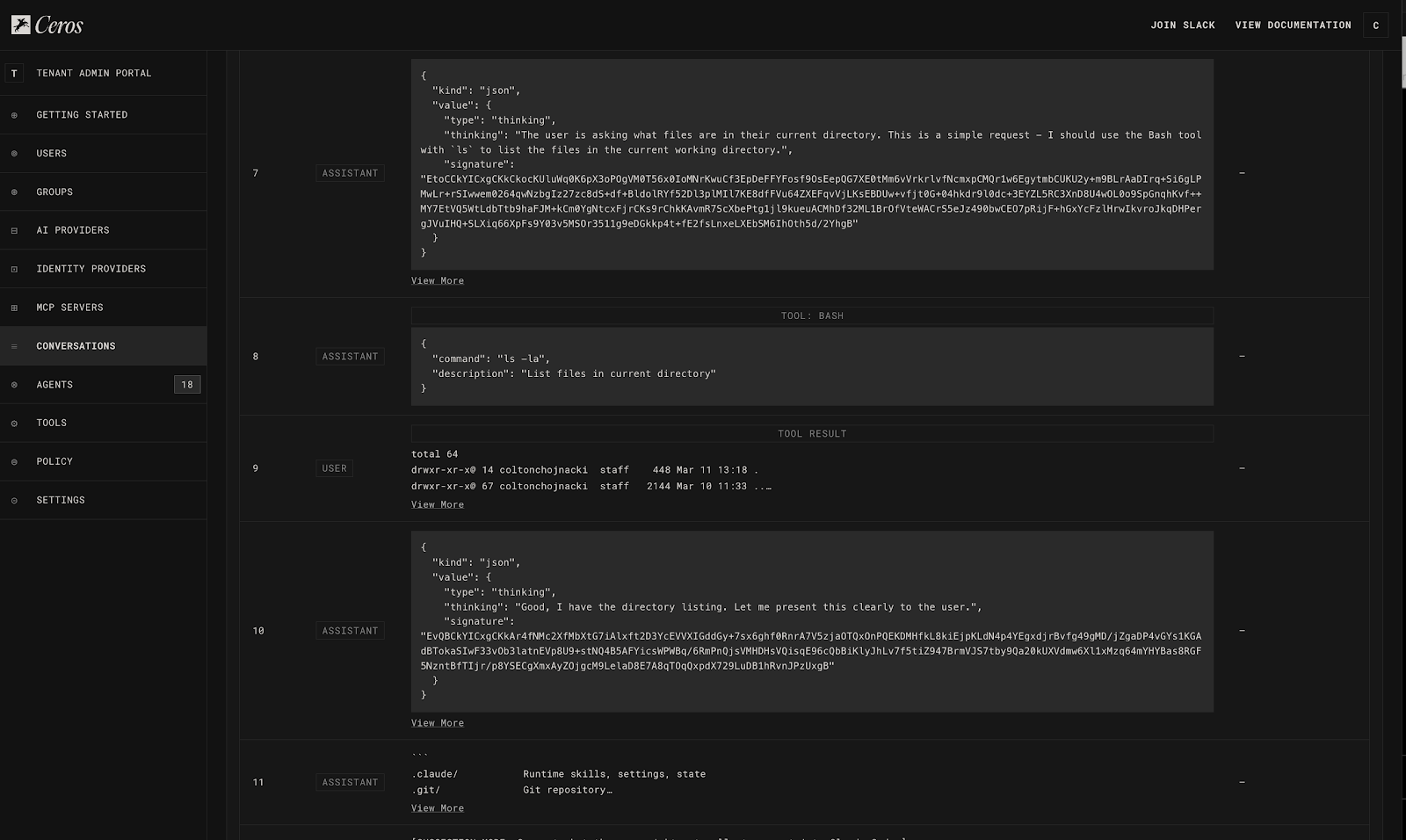
The Tools view has two tabs. The Definitions tab shows every tool available to Claude Code across the enrolled environment, including built-in tools like Bash, ReadFile, WriteFile, Edit, and SearchWeb, as well as every MCP server that developers have connected to their agents. Each entry includes the tool’s full schema: the instructions given to the LLM about what the tool does and how to invoke it.
The Calls tab shows what was actually executed. Not just what exists, but what was invoked, with what arguments, and what was returned. Security teams can drill into any individual tool call and see the exact command that ran, the arguments passed, and the full output that came back.
The MCP Server view is where many security teams have their most significant discovery moment. MCP servers are how Claude Code connects to external tools and services, including databases, Slack, email, internal APIs, and production infrastructure. Developers add them casually, thinking about productivity rather than security. Each one is a data access path that nobody reviewed.
The Ceros dashboard shows every MCP server connected to Claude Code across all enrolled devices, when it was first seen, which devices it appears on, and whether it has been approved. For most organizations, the gap between what security teams assumed was connected and what is actually connected is significant.
Policies: Enforcing Controls on Claude Code at Runtime
Visibility without governance surfaces risk, but it does not prevent it. The Policies section is where Ceros moves from observability to enforcement, and where the compliance story becomes concrete.
Policies in Ceros are evaluated at runtime, before the action executes. This distinction matters for compliance: the control operates at the moment of the action, not reconstructed after the fact.
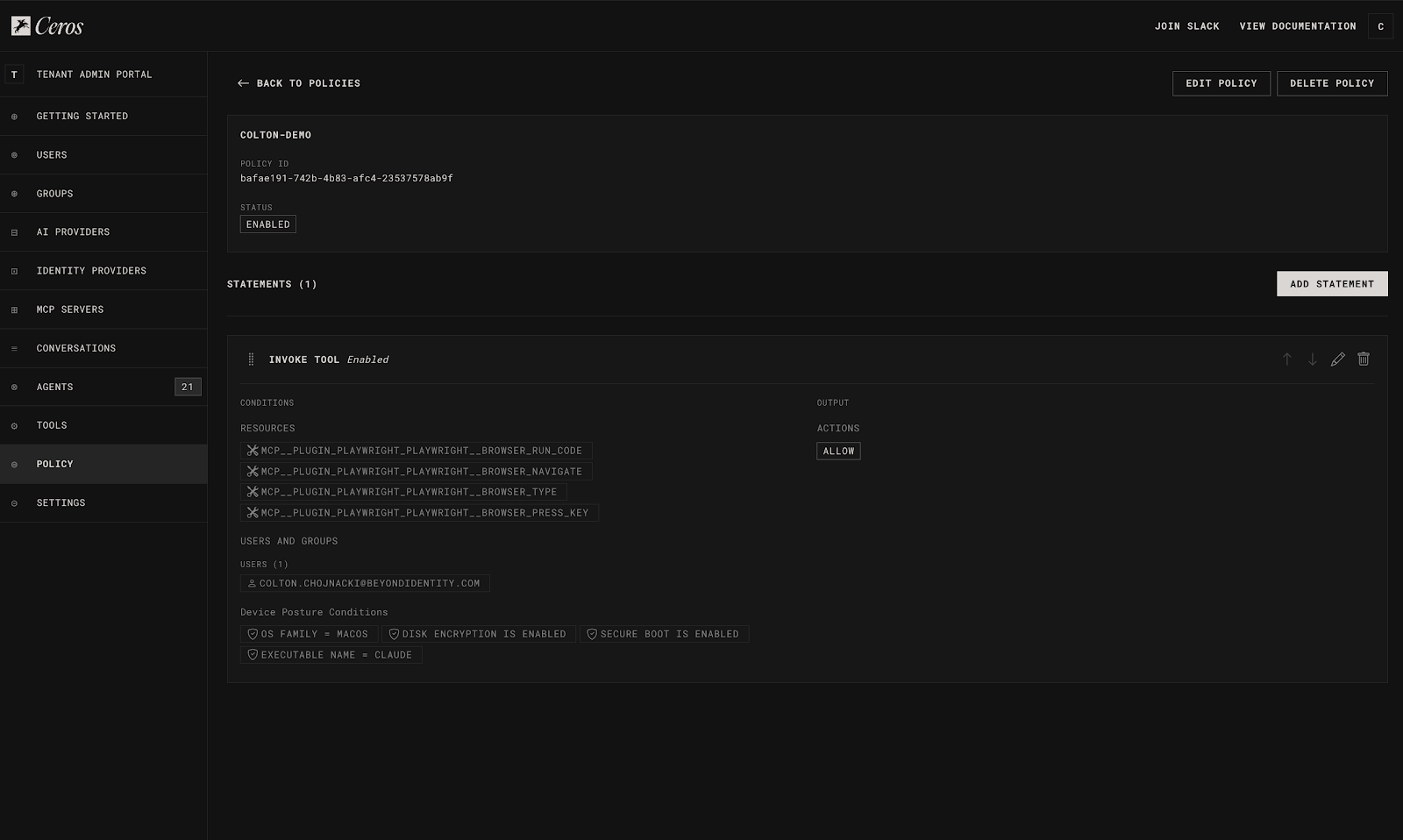
MCP server allowlisting is the highest-impact policy most organizations write first. Administrators define a list of approved MCP servers and set the default to block everything else. From that point forward, any Claude Code instance attempting to connect to an unapproved MCP server is blocked before the connection is established, and the attempt is logged.
Tool-level policies allow administrators to control which tools Claude Code can invoke and under what conditions. A policy can block the Bash tool entirely for teams that do not need shell access from their agents. It can allow file reads within the project directory while blocking reads in sensitive paths like ~/.ssh/ or /etc/. The policy engine evaluates not just which tool is being called but what arguments are being passed, which is the difference between a useful policy and policy theater.
Device posture requirements gate Claude Code sessions on the security state of the machine. A policy can require that disk encryption be enabled and endpoint protection be running before a session is allowed to start. Ceros continuously reassesses device posture throughout the session, not just at login. If endpoint protection is disabled while Claude Code is active, Ceros sees it and acts on it based on policy.
The Activity Log: Audit-Ready Evidence
The Activity Log is where Ceros becomes directly relevant to compliance teams. Every entry is not simply a record; it is a forensic snapshot of the environment at the exact moment Claude Code was invoked.
A single log entry contains the device’s full security posture at that moment, the complete process ancestry showing every process in the chain that invoked Claude Code, binary signatures of every executable in that ancestry, the OS-level user identity tied to a verified human, and every action Claude Code took during the session.
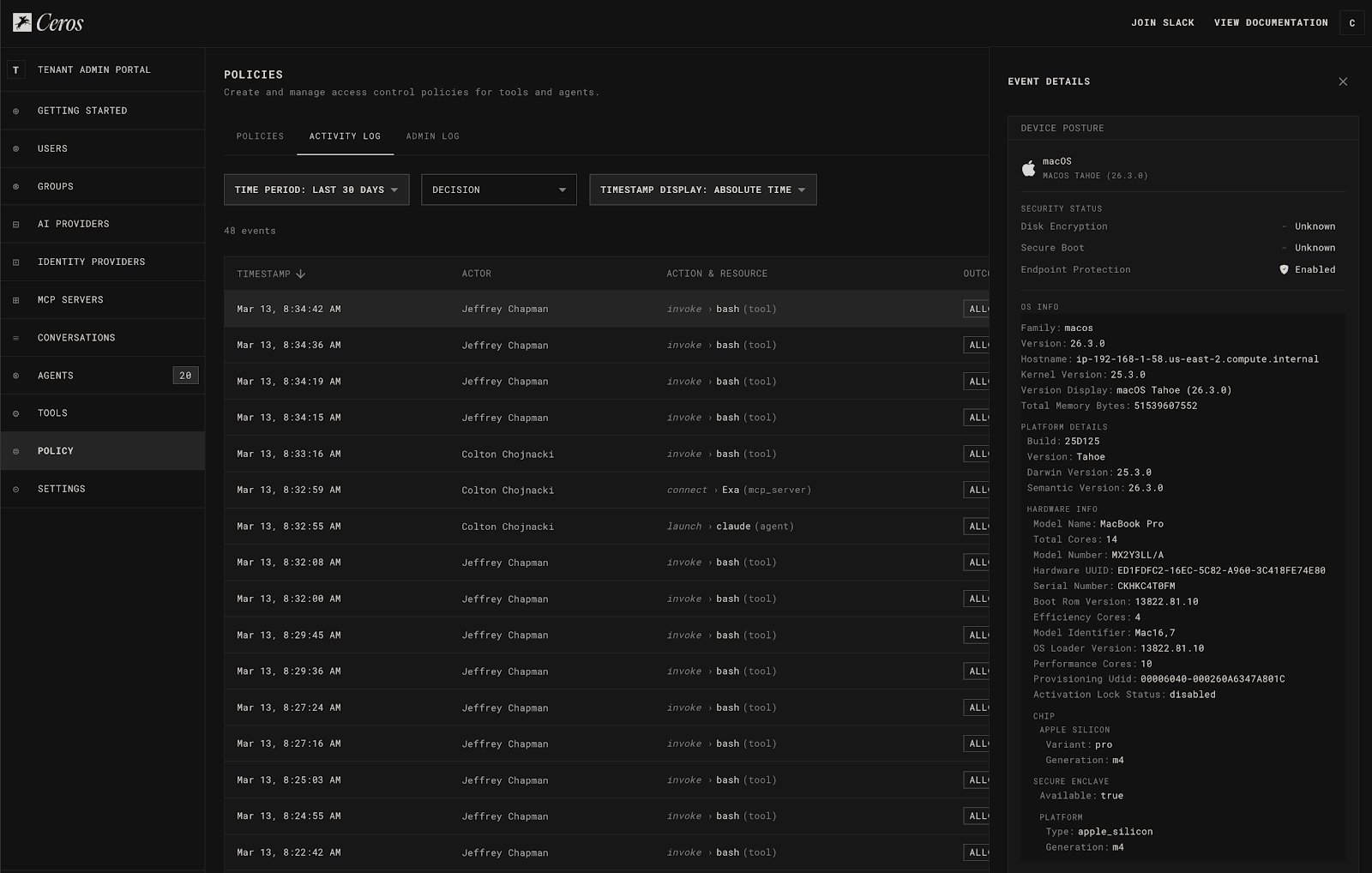
This matters for compliance because auditors increasingly require proof that logs are immutable. Standard log files that administrators can edit do not satisfy this requirement. Ceros signs every entry with a hardware-bound cryptographic key before it leaves the machine. The log cannot be modified after the fact.
For frameworks that require tamper-evident audit records, including SOC 2’s CC8.1, FedRAMP’s AU-9, HIPAA’s audit control requirements, and PCI-DSS v4.0’s Requirement 10, this is the specific evidence artifact that satisfies the control. When an auditor asks for evidence of monitoring and access controls on AI agents, the answer is an export from the Ceros dashboard covering the full audit period, cryptographically signed, with user attribution and device context on every entry.
Managed MCP Deployment: Standardizing Claude Code’s Tooling Across the Org
For organizations that want to standardize the tools available to Claude Code rather than only blocking unapproved ones, Ceros provides managed MCP deployment from the admin console.
Administrators can push approved MCP servers to every developer’s Claude Code instance from a single interface, without requiring any developer configuration. The MCP server appears in the developer’s agent automatically on the next launch.
Combined with MCP server allowlisting, this creates a complete governance model: administrators define what is required, what is permitted, and what is blocked. Developers work within that envelope without friction.
The Dashboard: Agentic AI Risk Posture Across the Org
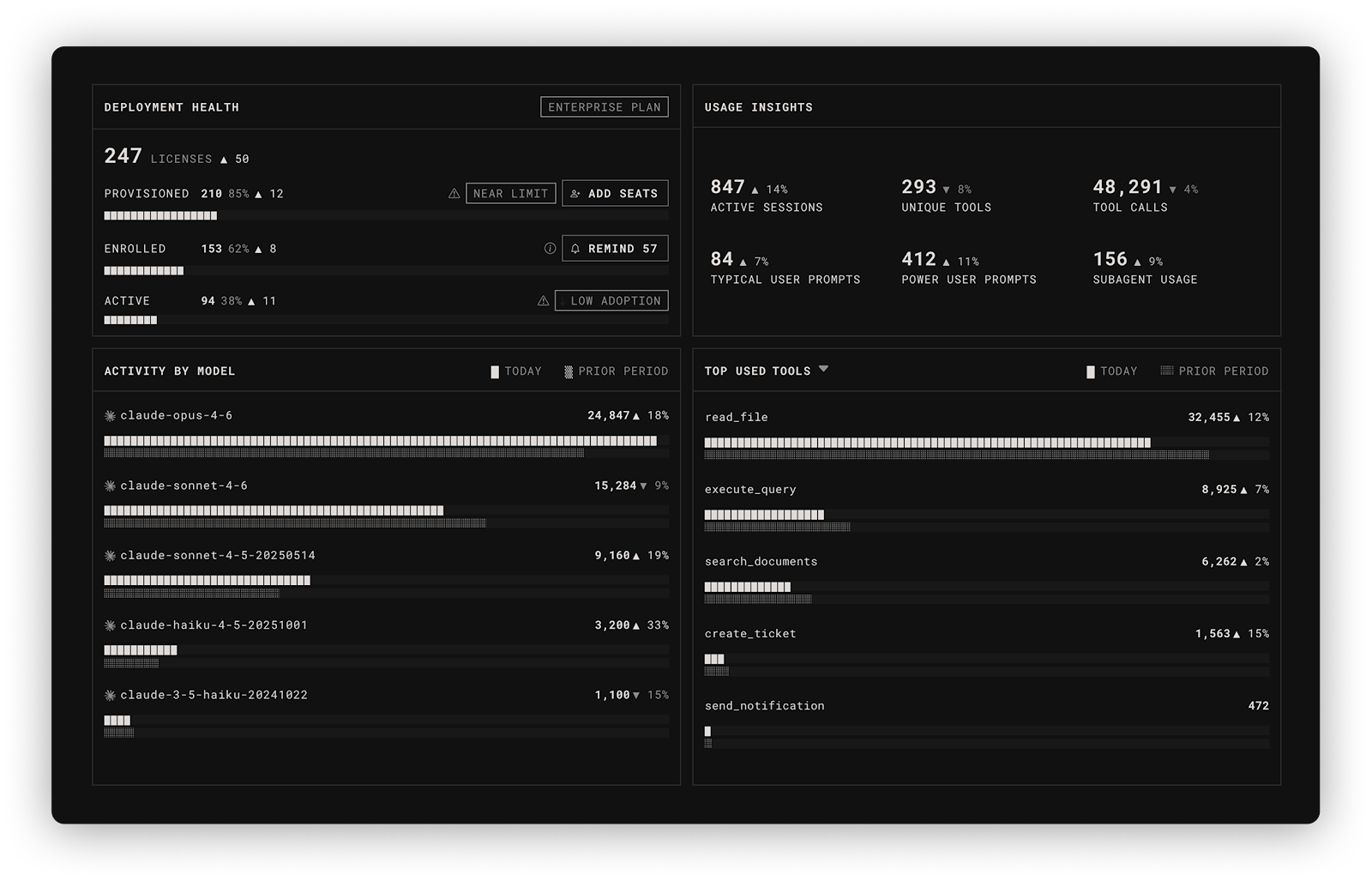
Coming up is The Dashboard, a single view of AI risk posture across your entire enrolled organization. Where the session-level views tell you what one developer’s agent did, the Dashboard tells you what is happening across the fleet: how many devices are provisioned, enrolled, and actively running Claude Code, with automatic flagging when adoption gaps indicate that agents are running outside the Ceros enrollment path and outside your controls. Sign up to be notified when The Dashboard ships.
Conclusion
The security gap that Claude Code creates is not at the network edge. It is on the developer’s machine, where the agent operates before any existing security tool can see it. Ceros closes that gap by living where the agent lives, capturing everything before it executes, and producing cryptographically signed evidence that security and compliance teams can act on.
For security teams whose organizations have deployed Claude Code and are beginning to reckon with what that means for their audit posture and controls, the starting point is visibility. You cannot govern what you cannot see, and until now, there has been no tooling that could show you what Claude Code was actually doing.
Ceros is available now, and getting started is free. Security teams can enroll a device and see their Claude Code activity for the first time at beyondidentity.ai.
Ceros is built by Beyond Identity, which is SOC 2 / FedRAMP compliant and deployable as cloud SaaS, self-hosted, or fully air-gapped on-premises.
The post “How Ceros Gives Security Teams Visibility and Control in Claude Code” appeared first on The Hacker News
Source:The Hacker News – [email protected] (The Hacker News)