
Skip to content
NGTEdu Logo

NGTEdu

A PRODUCT OF NGTECH.CO.IN

NGTEdu Logo

NGTEdu

  • Home
  • Cyber Attacks
  • Malware
  • Vulnerabilities
  • Data Breach
  • Home
  • Data Breach
  • Salesforce Monitoring with Tripwire Configuration Manager
  • Data Breach

Salesforce Monitoring with Tripwire Configuration Manager

4 years ago Ben Layer
Salesforce Monitoring with Tripwire Configuration Manager

You may already know that Tripwire Configuration Manager can audit your cloud service provider accounts like AWS, Azure, and Google Cloud Platform, but did you know it also has capabilities to monitor other cloud based software services such as Salesforce?  

Salesforce is a popular customer relationship management (CRM) service with rich configuration options that could lead to unintended risks if it is improperly configured. Tripwire has created a security policy within Configuration Manager which can check settings in your Salesforce account for potential risks or exposures and even auto-remediate many common misconfigurations.

To see how easy it is to configure, let’s review the basics of scanning a Salesforce account with Tripwire Configuration Manager. If you aren’t already familiar with the Configuration Manager, now is the perfect time to set up a Configuration Manager free trial to follow along. 

Most of the steps shown will be similar across the different supported cloud account types. While the specific configuration details may vary, the general workflow will be the same whether you are scanning AWS, Salesforce, or any other supported cloud service.

Salesforce Monitoring

Begin by creating a new cloud account entry within Configuration Manager. On the left side of the Manager window, look for the Environment heading. Below that is the Cloud Accounts section where you can select the New button.
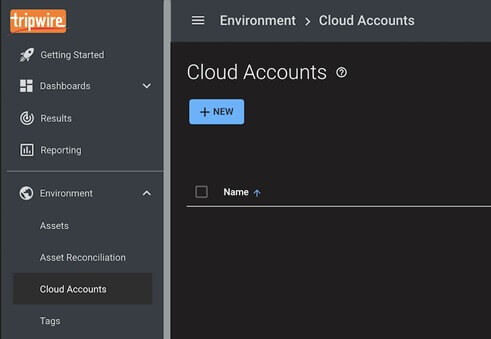
Select Salesforce in the Choose a Cloud Provider input field to expand the configuration options available for the Salesforce account type. 

Cloud TW CM image 2

In order for Configuration Manager to evaluate the security-related settings in your Salesforce account, you will need to provide details of the account to use for scanning. You will need to provide a Salesforce connected app consumer key, a user ID, and the key used for the connected app. Configuration Manager can generate a key pair to use with a new connected app, or you may provide an existing one.

Steps for creating a Salesforce-connected app with appropriate permissions and for gathering the needed configuration values are provided in the getting started help documentation. This can be found in the left-hand navigation menu within Configuration Manager.

Cloud TW CM image 3

Once your Salesforce cloud account is configured, you will be prompted to schedule a scan for the new account. You can also create and edit scheduled scans on the Schedules tab of the Cloud Compliance dashboard.

Cloud Salesforce Tripwire 4

On the new schedule page, you can choose Cloud Accounts to be scanned, which policies to evaluate against, and the repeating nature of the scan.

In this case, choose the newly created Salesforce account in the Account Selection section and the Salesforce – Tripwire v1.0 Policy in the Evaluation section. You can choose to scan just once or on a recurring schedule. 

Ensure the “Is Enabled” selection is checked, and save your new schedule. 

Cloud Tripwire Salesforce image 5

If you are ready to scan now, you can also select the schedule on the Schedules page and choose Start to run immediately. Otherwise, you can simply await the scheduled time for the scan to run.

When the scan completes, the Cloud Compliance dashboard will show the results of your Salesforce account evaluated against Tripwire recommended settings for Salesforce.

Cloud TW CM image 6

This fast and simple setup can secure your Salesforce account from dangerous security misconfigurations. Try Tripwire Configuration Manager free for 30 days and discover how Tripwire can keep your cloud accounts compliant with best practice configurations by automatically remediating and enforcing common secure configurations.

The post ” Salesforce Monitoring with Tripwire Configuration Manager” appeared first on TripWire

Source:TripWire – Ben Layer

Tags: Cloud, Encryption, Google, TripWire

Continue Reading

Previous Learning All About Ghidra – Inside a Class with Craig Young
Next Windows 10, Linux, iOS, Chrome and Many Others at Hacked Tianfu Cup 2021

More Stories

  • Cyber Attacks
  • Data Breach
  • Malware
  • Vulnerabilities

Researchers Find 341 Malicious ClawHub Skills Stealing Data from OpenClaw Users

9 hours ago [email protected] (The Hacker News)
  • Cyber Attacks
  • Data Breach
  • Vulnerabilities

OpenClaw Bug Enables One-Click Remote Code Execution via Malicious Link

10 hours ago [email protected] (The Hacker News)
  • Cyber Attacks
  • Data Breach

Microsoft Begins NTLM Phase-Out With Three-Stage Plan to Move Windows to Kerberos

11 hours ago [email protected] (The Hacker News)
  • Critical Vulnerability
  • Cyber Attacks
  • Data Breach
  • Malware
  • Vulnerabilities

⚡ Weekly Recap: Proxy Botnet, Office Zero-Day, MongoDB Ransoms, AI Hijacks & New Threats

15 hours ago [email protected] (The Hacker News)
  • Critical Vulnerability
  • Cyber Attacks
  • Data Breach

Securing the Mid-Market Across the Complete Threat Lifecycle

15 hours ago [email protected] (The Hacker News)
  • Cyber Attacks
  • Data Breach
  • Malware
  • Vulnerabilities

Notepad++ Official Update Mechanism Hijacked to Deliver Malware to Select Users

18 hours ago [email protected] (The Hacker News)

Recent Posts

  • Researchers Find 341 Malicious ClawHub Skills Stealing Data from OpenClaw Users
  • OpenClaw Bug Enables One-Click Remote Code Execution via Malicious Link
  • Microsoft Begins NTLM Phase-Out With Three-Stage Plan to Move Windows to Kerberos
  • ⚡ Weekly Recap: Proxy Botnet, Office Zero-Day, MongoDB Ransoms, AI Hijacks & New Threats
  • Securing the Mid-Market Across the Complete Threat Lifecycle

Tags

Android APT Bug CERT Cloud Compliance Coronavirus COVID-19 Critical Severity Encryption Exploit Facebook Finance Google Google Chrome Goverment Hacker Hacker News High Severity Instagram iPhone Java Linux Low Severity Malware Medium Severity Microsoft Moderate Severity Mozzila Firefox Oracle Patch Tuesday Phishing Privacy QuickHeal Ransomware RAT Sim The Hacker News Threatpost TikTok TripWire VMWARE Vulnerability Whatsapp Zoom
Copyright © 2020 All rights reserved | NGTEdu.com
This website uses cookies to improve your experience. We'll assume you're ok with this, but you can opt-out if you wish. Read More here.Cookie settingsACCEPT
Privacy & Cookies Policy

Privacy Overview

This website uses cookies to improve your experience while you navigate through the website. Out of these cookies, the cookies that are categorized as necessary are stored on your browser as they are essential for the working of basic functionalities of the website. We also use third-party cookies that help us analyze and understand how you use this website. These cookies will be stored in your browser only with your consent. You also have the option to opt-out of these cookies. But opting out of some of these cookies may have an effect on your browsing experience.
Necessary
Always Enabled
Necessary cookies are absolutely essential for the website to function properly. This category only includes cookies that ensures basic functionalities and security features of the website. These cookies do not store any personal information.
Non-necessary
Any cookies that may not be particularly necessary for the website to function and is used specifically to collect user personal data via analytics, ads, other embedded contents are termed as non-necessary cookies. It is mandatory to procure user consent prior to running these cookies on your website.
SAVE & ACCEPT