
Skip to content
NGTEdu Logo

NGTEdu

A PRODUCT OF NGTECH.CO.IN

NGTEdu Logo

NGTEdu

  • Home
  • Cyber Attacks
  • Malware
  • Vulnerabilities
  • Data Breach
  • Home
  • Data Breach
  • Ghidra 101: Loading Windows Symbols (PDB files) in Ghidra 10.x
  • Data Breach

Ghidra 101: Loading Windows Symbols (PDB files) in Ghidra 10.x

5 years ago Craig Young
Ghidra 101: Loading Windows Symbols (PDB files) in Ghidra 10.x

In this blog series, I will be putting the spotlight on useful Ghidra features you may have missed. Each post will look at a different feature and show how it helps you save time and be more effective in your reverse engineering workflows. Ghidra is an incredibly powerful tool, but much of this power comes from knowing how to use it effectively.

In this post, I will again be going over how to use Ghidra to download symbols from a PDB Symbol Server and apply them to a loaded program. As noted in the previous post on this feature, PDB support is a rapidly evolving feature. Ghidra 10.x has made some considerable improvements including a new workflow with support for multiple local or remote symbol servers. This post contains updated steps for using Ghidra to download and apply symbols for a Windows OS binary. Please refer to the previous post for more information on the background of this feature.

Without further introduction, here are the steps for identifying, downloading, and applying Windows PDB files from Microsoft’s public symbol server. The steps were tested on macOS running Ghidra 10.0.1 via Amazon Corretto for JDK 11:

Step 1: Import a Windows executable or library into a Ghidra project.

Step 2: Open the program in CodeBrowser and select ‘No’ when asked to analyze the program.

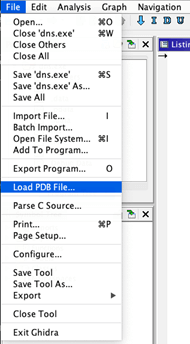
Step 3: Select ‘Load PDB File…’ from the File menu.
Step 4: Click “Config…” to load the Symbol Server Search Config window.

Step 5: Click the ‘…’ button, select a local path to store symbols, and click OK.

Step 6: Click ‘Yes’ to initialize the new directory.

Step 7: Click the ‘+’ icon to add a new symbol server location.

Multiple servers can be added to the search path. Click OK when all desired servers are added to the config. The pre-defined options in 10.0.1 are:

Step 8: The ‘Load PDB’ window is shown again. Click ‘Advanced >>’ to reveal the ‘PDB Search’ section and click ‘Search All’ to query remote servers for the program’s PDB file.

Results are displayed in a table. Select an appropriate PDB and click ‘Load’ to apply it to your session.

Step 9: Be patient while Ghidra applies the PDB.

Step 10: Kick off an Auto Analysis by using the shortcut key ‘A’ or the menu ‘Analysis->Auto Analyze <Program>….’

All available Ghidra views and plugins should now be integrated with the debugging information from the PDB.

Read More about Ghidra

Ghidra 101: Cursor Text Highlighting

Ghidra 101: Slice Highlighting

Ghidra 101: Decoding Stack Strings

Ghidra 101: Loading Windows Symbols (PDB files)

Ghidra 101: Creating Structures in Ghidra

The post ” Ghidra 101: Loading Windows Symbols (PDB files) in Ghidra 10.x” appeared first on TripWire

Source:TripWire – Craig Young

Tags: Encryption, Microsoft, TripWire

Continue Reading

Previous Babuk Ransomware Gang Ransomed, New Forum Stuffed With Porn
Next Apple Releases Urgent 0-Day Bug Patch for Mac, iPhone and iPad Devices

More Stories

  • Data Breach

[Webinar] The Smarter SOC Blueprint: Learn What to Build, Buy, and Automate

15 hours ago [email protected] (The Hacker News)
  • Critical Vulnerability
  • Cyber Attacks
  • Data Breach
  • Vulnerabilities

Hackers Exploit Metro4Shell RCE Flaw in React Native CLI npm Package

15 hours ago [email protected] (The Hacker News)
  • Critical Vulnerability
  • Data Breach

When Cloud Outages Ripple Across the Internet

18 hours ago [email protected] (The Hacker News)
  • Cyber Attacks
  • Data Breach
  • Malware
  • Vulnerabilities

APT28 Uses Microsoft Office CVE-2026-21509 in Espionage-Focused Malware Attacks

20 hours ago [email protected] (The Hacker News)
  • Cyber Attacks
  • Data Breach

Mozilla Adds One-Click Option to Disable Generative AI Features in Firefox

24 hours ago [email protected] (The Hacker News)
  • Cyber Attacks
  • Data Breach
  • Malware
  • Vulnerabilities

Notepad++ Hosting Breach Attributed to China-Linked Lotus Blossom Hacking Group

1 day ago [email protected] (The Hacker News)

Recent Posts

  • http://thehackernews.com/2026/02/docker-fixes-critical-ask-gordon-ai.html
  • [Webinar] The Smarter SOC Blueprint: Learn What to Build, Buy, and Automate
  • Hackers Exploit Metro4Shell RCE Flaw in React Native CLI npm Package
  • When Cloud Outages Ripple Across the Internet
  • APT28 Uses Microsoft Office CVE-2026-21509 in Espionage-Focused Malware Attacks

Tags

Android APT Bug CERT Cloud Compliance Coronavirus COVID-19 Critical Severity Encryption Exploit Facebook Finance Google Google Chrome Goverment Hacker Hacker News High Severity Instagram iPhone Java Linux Low Severity Malware Medium Severity Microsoft Moderate Severity Mozzila Firefox Oracle Patch Tuesday Phishing Privacy QuickHeal Ransomware RAT Sim The Hacker News Threatpost TikTok TripWire VMWARE Vulnerability Whatsapp Zoom
Copyright © 2020 All rights reserved | NGTEdu.com
This website uses cookies to improve your experience. We'll assume you're ok with this, but you can opt-out if you wish. Read More here.Cookie settingsACCEPT
Privacy & Cookies Policy

Privacy Overview

This website uses cookies to improve your experience while you navigate through the website. Out of these cookies, the cookies that are categorized as necessary are stored on your browser as they are essential for the working of basic functionalities of the website. We also use third-party cookies that help us analyze and understand how you use this website. These cookies will be stored in your browser only with your consent. You also have the option to opt-out of these cookies. But opting out of some of these cookies may have an effect on your browsing experience.
Necessary
Always Enabled
Necessary cookies are absolutely essential for the website to function properly. This category only includes cookies that ensures basic functionalities and security features of the website. These cookies do not store any personal information.
Non-necessary
Any cookies that may not be particularly necessary for the website to function and is used specifically to collect user personal data via analytics, ads, other embedded contents are termed as non-necessary cookies. It is mandatory to procure user consent prior to running these cookies on your website.
SAVE & ACCEPT