
Skip to content
NGTEdu Logo

NGTEdu

A PRODUCT OF NGTECH.CO.IN

NGTEdu Logo

NGTEdu

  • Home
  • Cyber Attacks
  • Malware
  • Vulnerabilities
  • Data Breach
  • Home
  • Data Breach
  • Ghidra 101: Loading Windows Symbols (PDB files)
  • Data Breach

Ghidra 101: Loading Windows Symbols (PDB files)

5 years ago Craig Young
Ghidra 101: Loading Windows Symbols (PDB files)

In this blog series, I will be putting the spotlight on useful Ghidra features you may have missed. Each post will look at a different feature and show how it helps you save time and be more effective in your reverse engineering workflows. Ghidra is an incredibly powerful tool, but much of this power comes from knowing how to use it effectively.

The process of transforming source code into application binaries is a lossy process, but at least some of this data can be reincorporated into a Ghidra analysis by loading debug information. In fact, Microsoft maintains a repository of program database (PDB) files with debugging information about each published executable file. The PDB files generated when linking an application can be used to correlate particular instructions with source code file name and line numbers as well as to label variables and functions with symbolic names from the source. Although not strictly necessary for a successful analysis, loading a PDB file can greatly accelerate the reversing process by giving a glimpse into the authors’ thought process.

Ghidra helpfully provides functionality for identifying and downloading PDB files from a symbol server. Although initial releases of Ghidra required Windows, the release of version 9.2 in November 2020 has introduced a platform-independent PDB parser, thereby opening the doors for Linux and macOS users to easily analyze Windows components complete with symbol information. In this post, I will briefly recap the steps for using Ghidra to analyze a Windows binary with details loaded from Microsoft’s symbol server.

Being able to do this natively in Ghidra without a Windows computer is a big productivity boost for those of us who must occasionally dissect Windows binaries but who do not primarily use Windows as a native OS. It is really fantastic to see the Ghidra developers adding features that directly improve my workflow, and I can’t wait to see what’s in the pipeline for new features.

Without further introduction, here are the steps for identifying, downloading and applying Windows PDB files from Microsoft’s public symbol server. The steps were tested on macOS running Ghidra 9.2.2 via Amazon Corretto for JDK 11:

Step 1: Import a Windows executable or library into a Ghidra project.

Step 2: Open the program in CodeBrowser and select ‘No’ when asked to analyze the program.

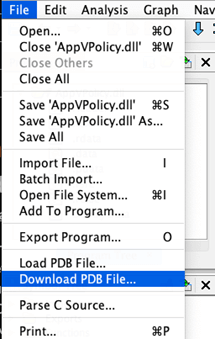
Step 3: Select ‘Download PDB’ from the File menu
Step 4: Select ‘PDB’ when prompted to choose between PDB and XML

Select ‘PDB’ when prompted to choose between PDB and XML

Step 5: The next prompt asks about using a search path specified in the executable. Select ‘No’ and then select a local folder where PDB files should be downloaded.

Step 6: Click ‘Choose from known URLs’ to select an appropriate download URL and click ‘Download from URL.’

 click ‘Download from URL’

Step 7: After a pop-up confirming the download success, select ‘Yes’ to apply the PDB.

select ‘Yes’ to apply the PDB.

Step 8: Confirm the PDB load options by clicking ‘Apply.’

Confirm the PDB load options by clicking ‘Apply’

Step 9: Be patient while the symbols load. This can take a few minutes.

Load PDB

Step 10: Observe that the symbol tree has been populated with descriptive symbol names.

The symbol tree has been populated with descriptive symbol names.

All available Ghidra views and plugins should now be integrated with the debugging information from the PDB.

The post ” Ghidra 101: Loading Windows Symbols (PDB files)” appeared first on TripWire

Source:TripWire – Craig Young

Tags: Encryption, Linux, Microsoft, TripWire

Continue Reading

Previous Compliance – The Invisible Hand of Cybersecurity
Next Microsoft Exchange Hackers Also Breached European Banking Authority

More Stories

  • Data Breach

[Webinar] The Smarter SOC Blueprint: Learn What to Build, Buy, and Automate

2 hours ago [email protected] (The Hacker News)
  • Critical Vulnerability
  • Data Breach

When Cloud Outages Ripple Across the Internet

5 hours ago [email protected] (The Hacker News)
  • Cyber Attacks
  • Data Breach
  • Malware
  • Vulnerabilities

APT28 Uses Microsoft Office CVE-2026-21509 in Espionage-Focused Malware Attacks

7 hours ago [email protected] (The Hacker News)
  • Cyber Attacks
  • Data Breach

Mozilla Adds One-Click Option to Disable Generative AI Features in Firefox

11 hours ago [email protected] (The Hacker News)
  • Cyber Attacks
  • Data Breach
  • Malware
  • Vulnerabilities

Notepad++ Hosting Breach Attributed to China-Linked Lotus Blossom Hacking Group

12 hours ago [email protected] (The Hacker News)
  • Cyber Attacks
  • Data Breach
  • Malware
  • Vulnerabilities

Researchers Find 341 Malicious ClawHub Skills Stealing Data from OpenClaw Users

23 hours ago [email protected] (The Hacker News)

Recent Posts

  • [Webinar] The Smarter SOC Blueprint: Learn What to Build, Buy, and Automate
  • When Cloud Outages Ripple Across the Internet
  • APT28 Uses Microsoft Office CVE-2026-21509 in Espionage-Focused Malware Attacks
  • Mozilla Adds One-Click Option to Disable Generative AI Features in Firefox
  • Notepad++ Hosting Breach Attributed to China-Linked Lotus Blossom Hacking Group

Tags

Android APT Bug CERT Cloud Compliance Coronavirus COVID-19 Critical Severity Encryption Exploit Facebook Finance Google Google Chrome Goverment Hacker Hacker News High Severity Instagram iPhone Java Linux Low Severity Malware Medium Severity Microsoft Moderate Severity Mozzila Firefox Oracle Patch Tuesday Phishing Privacy QuickHeal Ransomware RAT Sim The Hacker News Threatpost TikTok TripWire VMWARE Vulnerability Whatsapp Zoom
Copyright © 2020 All rights reserved | NGTEdu.com
This website uses cookies to improve your experience. We'll assume you're ok with this, but you can opt-out if you wish. Read More here.Cookie settingsACCEPT
Privacy & Cookies Policy

Privacy Overview

This website uses cookies to improve your experience while you navigate through the website. Out of these cookies, the cookies that are categorized as necessary are stored on your browser as they are essential for the working of basic functionalities of the website. We also use third-party cookies that help us analyze and understand how you use this website. These cookies will be stored in your browser only with your consent. You also have the option to opt-out of these cookies. But opting out of some of these cookies may have an effect on your browsing experience.
Necessary
Always Enabled
Necessary cookies are absolutely essential for the website to function properly. This category only includes cookies that ensures basic functionalities and security features of the website. These cookies do not store any personal information.
Non-necessary
Any cookies that may not be particularly necessary for the website to function and is used specifically to collect user personal data via analytics, ads, other embedded contents are termed as non-necessary cookies. It is mandatory to procure user consent prior to running these cookies on your website.
SAVE & ACCEPT