
Skip to content
NGTEdu Logo

NGTEdu

A PRODUCT OF NGTECH.CO.IN

NGTEdu Logo

NGTEdu

  • Home
  • Cyber Attacks
  • Malware
  • Vulnerabilities
  • Data Breach
  • Home
  • Data Breach
  • Ghidra 101: Cursor Text Highlighting
  • Data Breach

Ghidra 101: Cursor Text Highlighting

5 years ago Craig Young
Ghidra 101: Cursor Text Highlighting

In this blog series, I will be putting the spotlight on useful Ghidra features that you may have missed. Each post will look at a different feature and show how it helps you save time and be more effective while reverse engineering. Ghidra is an incredibly powerful tool, but much of this power comes from knowing how to use it effectively.

What is Cursor Text Highlighting?

In this post, I will be discussing the Cursor Text Highlighting feature. By default, this feature is activated by clicking on text in the Listing or Decompiler view with the middle mouse button (scroll wheel for most of us). As you might have guessed from the name, this feature can highlight occurrences of a string within the Listing or Decompiler view. This is a rather standard feature we’ve grown to expect in any basic graphical IDE, but use Ghidra’s Cursor Text Highlighting on a register in the Listing view and you might notice it doing something more. When using this feature to follow register usage, Ghidra will color the register according to whether it is being read from or being written to.

Text highlighting can draw your attention to how an address or label is being used, especially in the early stages of a reversing workflow where many variables may share similar names. As noted in the Ghidra issue tracker, this is a useful feature, but it is not particularly well advertised, and having it tied to the middle-click by default means that many users never notice it on their own.

It is important to understand, however, that there are two distinct matching behaviors:

  1. Clicking on a register highlights use of that register with the scoped read/write colors configured in the Tool Options.
  2. Clicking on any other text will highlight other occurrences of this string in the highlight color specified under the Tool Options. This direct string search will highlight text throughout the view including in comments.

Highlights are made within the active view as shown here:
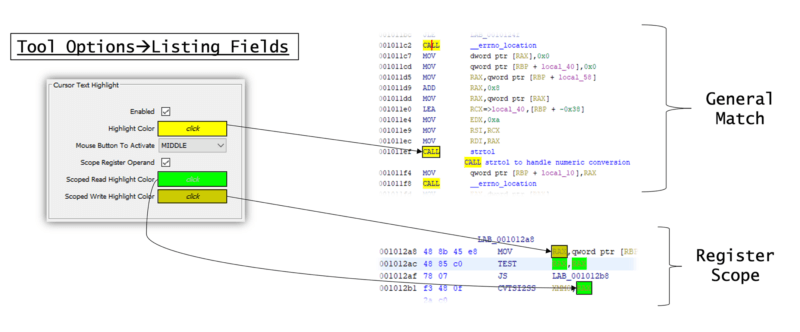
For systems without a middle-mouse button, the feature can be reassigned via the Tool Options to use the left or right mouse button instead of the middle.

That’s everything you need to know to start utilizing cursor text and scope highlighting in Ghidra. Keep an eye on the State of Security Blog for my next Ghidra 101 post in which I’ll be going over how to highlight program slices to reveal relationships between variable values.

Later on in this series, I’ll be looking at automatically creating data structures, recovering stack strings, applying multi-level table sorts, and more.

The post ” Ghidra 101: Cursor Text Highlighting” appeared first on TripWire

Source:TripWire – Craig Young

Tags: Encryption, TripWire

Continue Reading

Previous 4 Things a Good Vulnerability Management Policy Should Include
Next NSA Warns Russian Hacker Exploiting VMware Bug to Breach Corporate Networks

More Stories

  • Cyber Attacks
  • Data Breach

AISURU/Kimwolf Botnet Launches Record-Setting 31.4 Tbps DDoS Attack

11 hours ago [email protected] (The Hacker News)
  • Critical Vulnerability
  • Cyber Attacks
  • Data Breach
  • Malware
  • Vulnerabilities

ThreatsDay Bulletin: Codespaces RCE, AsyncRAT C2, BYOVD Abuse, AI Cloud Intrusions & 15+ Stories

15 hours ago [email protected] (The Hacker News)
  • Data Breach

The Buyer’s Guide to AI Usage Control

17 hours ago [email protected] (The Hacker News)
  • Cyber Attacks
  • Data Breach
  • Malware
  • Vulnerabilities

Infy Hackers Resume Operations with New C2 Servers After Iran Internet Blackout Ends

18 hours ago [email protected] (The Hacker News)
  • Critical Vulnerability
  • Cyber Attacks
  • Data Breach
  • Vulnerabilities

Critical n8n Flaw CVE-2026-25049 Enables System Command Execution via Malicious Workflows

22 hours ago [email protected] (The Hacker News)
  • Critical Vulnerability
  • Cyber Attacks
  • Data Breach
  • Vulnerabilities

Malicious NGINX Configurations Enable Large-Scale Web Traffic Hijacking Campaign

24 hours ago [email protected] (The Hacker News)

Recent Posts

  • AISURU/Kimwolf Botnet Launches Record-Setting 31.4 Tbps DDoS Attack
  • ThreatsDay Bulletin: Codespaces RCE, AsyncRAT C2, BYOVD Abuse, AI Cloud Intrusions & 15+ Stories
  • The Buyer’s Guide to AI Usage Control
  • Infy Hackers Resume Operations with New C2 Servers After Iran Internet Blackout Ends
  • Critical n8n Flaw CVE-2026-25049 Enables System Command Execution via Malicious Workflows

Tags

Android APT Bug CERT Cloud Compliance Coronavirus COVID-19 Critical Severity Encryption Exploit Facebook Finance Google Google Chrome Goverment Hacker Hacker News High Severity Instagram iPhone Java Linux Low Severity Malware Medium Severity Microsoft Moderate Severity Mozzila Firefox Oracle Patch Tuesday Phishing Privacy QuickHeal Ransomware RAT Sim The Hacker News Threatpost TikTok TripWire VMWARE Vulnerability Whatsapp Zoom
Copyright © 2020 All rights reserved | NGTEdu.com
This website uses cookies to improve your experience. We'll assume you're ok with this, but you can opt-out if you wish. Read More here.Cookie settingsACCEPT
Privacy & Cookies Policy

Privacy Overview

This website uses cookies to improve your experience while you navigate through the website. Out of these cookies, the cookies that are categorized as necessary are stored on your browser as they are essential for the working of basic functionalities of the website. We also use third-party cookies that help us analyze and understand how you use this website. These cookies will be stored in your browser only with your consent. You also have the option to opt-out of these cookies. But opting out of some of these cookies may have an effect on your browsing experience.
Necessary
Always Enabled
Necessary cookies are absolutely essential for the website to function properly. This category only includes cookies that ensures basic functionalities and security features of the website. These cookies do not store any personal information.
Non-necessary
Any cookies that may not be particularly necessary for the website to function and is used specifically to collect user personal data via analytics, ads, other embedded contents are termed as non-necessary cookies. It is mandatory to procure user consent prior to running these cookies on your website.
SAVE & ACCEPT