
Ghidra 101: Creating Structures in Ghidra

In this blog series, I will be putting the spotlight on useful Ghidra features you may have missed. Each post will look at a different feature and show how it helps you save time and be more effective in your reverse engineering workflows. Ghidra is an incredibly powerful tool, but much of this power comes from knowing how to use it effectively.
Programmers commonly define composite data types to group related data for access with a single pointer. When programming in C (or various derivatives), this can be implemented with the struct data type. As a programmer, the member elements can then be accessed via named entries that correspond to fixed offsets from the struct pointer. As a reverse engineer, it is necessary to identify structures and correlate given offsets to specific data types and member variables. Fortunately, Ghidra makes this relatively painless with automatic struct creation and a visual editor to create or modify layouts. In this blog post, I will briefly show what a struct looks like in disassembly and decompilation before going over how to represent these data structures in your Ghidra project.
Disassembled Struct Access
When looking in disassembly, struct references can be spotted where a pointer (e.g. a register) is being dereferenced at various offsets. In the following example, from a Linux ls binary, RDI is a register-based function parameter containing the address of a FILE struct:
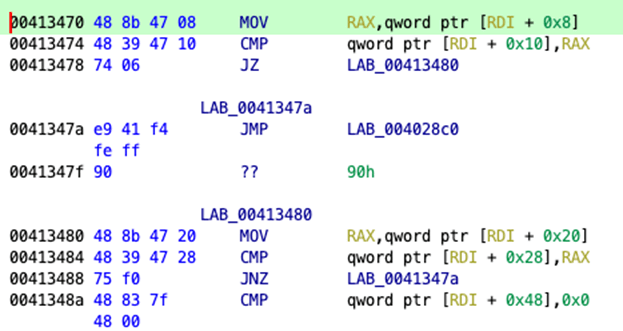
Explanation: At 0x413470, the data at offset 0x8 from the pointed struct is moved into RAX for comparison against the value at a 0x10 byte offset from the base of the struct. If the values are equal, the jump will be taken to LAB_00413480 where the value at offset 0x20 is compared against the value at offset 0x28 before a final NULL check of the value at offset 0x48.
The thing to recognize in the above example is that RDI is being accessed at 5 different offsets 0x8, 0x10, 0x20, 0x28 and 0x48, which are not evenly spaced. While this could be an array operation, this is not a typical use pattern of an array. This is a fairly strong indication that RDI is the base address of a struct. The compiler has simply computed the offset of member variables in the struct and hardcoded them to be more efficient at runtime.
Decompiled Struct Access
Decompiling this particular code shows that Ghidra was already able to infer not only that this is a struct but it has actually identified the specific struct and resolved the member variable names:

The right-click/context menu option ‘Edit Data Type’ is available on param_1 to review the data structure in the Ghidra Structure Editor:
A close look shows that the offset values in this struct definition do in fact match the values observed in the disassembly (8, 16, 32, 40 and 72) and also match the decompiled names.
In this case, there is no need to model the data structure since Ghidra has already enriched the reverse engineering with data from standard libraries. (param_1 is used in the same function as the argument to an imported function, which allows Ghidra to infer the data type.) In circumstances where Ghidra does not already have details about a data type, the disassembly should look roughly the same, but the Decompiler view will look quite different.
When lucky, Ghidra will decompile struct references into a rather obvious series of pointer math operations like:
  if (((*(long *)((long)param_1 + 0x10) == *(long *)((long)param_1 + 8)) &&
      (*(long *)((long)param_1 + 0x28) == *(long *)((long)param_1 + 0x20))) &&
     (*(long *)((long)param_1 + 0x48) == 0))
The above pattern should be easily recognized as a struct,but I’ve also worked on projects where a struct was modeled as an array, similar to the following:
if (((param_1[1] == *param_1) && (param_1[4] == param_1[3])) && (param_1[8] == 0)) This code represents a very similar condition to the code above, with the difference only being that all of the structure elements are the same length. In the main example, an int at the start of the data structure is a different length from the other structure members, and so Ghidra can infer with confidence that this is not an array but rather a struct.
Manually Creating a Data Structure
New data types can always be defined in the Ghidra Data Type Manager window, which is at the bottom left of a default CodeBrowser layout. A new structure definition is created by right-clicking on the program name in Data Type Manager and selecting NewàStructure… to load a blank structure editor instance. The plus icon in the toolbar is used to define member variables. The struct length must be adjusted to provide enough space, and then the data type can be specified. Alternatively, setting the structure size initially allows the user to fill in data types to automatically reallocate space.
Automatic Struct Creation
The manual process works well enough, but it can be a bit frustrating at times to enter the data, which is why it is great that Ghidra provides the ‘Auto Create Structure’ feature to start a structure definition using hints inferred from Ghidra’s analysis. This helpful feature is available from the Decompiler by right-clicking on the variable, which may be a struct:
Activating this feature will transform the above Decompiler output into a far more readable bit of code:
if (((param_1->field_0x10 == param_1->field_0x8) && (param_1->field_0x28 == param_1->field_0x20)) && (param_1->field_0x48 == 0))Editing the data type on param_1 now will show a partially defined struct in the Structure Editor window:
The structure has been created with generic name astruct, and while some data types were inferred, many of the types are not reflective of the original source code. From here, it is up to the reverse engineer to apply contextual information to update variable names and data types.
Refining a Structure Data Type
I have often had luck gaining enough context from log and debug messages embedded in code to give some more meaningful names. It is immensely helpful to see these names when the same offset is referenced in other parts of the program. In most cases, it is possible to make useful edits to the automatic structure directly from the param_1 context menu:
Rename Field and Retype Field make it possible to quickly rename a variable or assign a data type on the fly from decompiled output. It is important to note, however, that for a new data type to be assigned, the structure must have an appropriate space allocation. If there is not enough space available, Ghidra will error that the data type did not fit. This may happen particularly when dealing with things like nested structures where Ghidra may have already inferred the nested member variable data types.
Concluding Remarks
Ghidra’s decompiler is generally pretty good about recognizing when a struct is used, but there are situations when it can mistake a struct to be an array. When encountering an unknown struct in an analyzed program, Ghidra’s automatic struct creation feature is an excellent resource for creating a basic representation of the struct. It is limited to what can be inferred by analyzing offsets and context clues from the disassembly, but it will serve as a launching point as you progress through a reverse engineering effort.
Read More about Ghidra
Ghidra 101: Cursor Text Highlighting
Ghidra 101: Slice Highlighting
Ghidra 101: Decoding Stack Strings
The post ” Ghidra 101: Creating Structures in Ghidra” appeared first on TripWire
Source:TripWire – Craig Young