
Data Classification Is Data Storage

‘Business’ is a verb that practically means the movement of data. If you aren’t sharing data – keeping the books, sharing ideas and stats about sales, getting the correct information regarding the customer or data to the customer – then you aren’t doing much business. But organizations need to protect their data along the way.
Infosec has so many ways of protecting those sources of data, so much so that users of the data often complain. They can’t get their work done if all data is always locked up tightly, they assert.
The answer to these complaints is data classification. This principle shows up in most security awareness programs, and while it seems on paper to be a way to bridge the gap between sharing data/ideas and protecting that information, there are a couple of components that, if not discussed and understood by users, could prevent organizations from succeeding in protecting what needs to be protected.
Let’s examine these issues below.
Classification schemas
Any schema for data classification buckets the data, though the number of buckets and names are specific to the company’s needs. In a whitepaper, the SANS Institute identifies some of the most common data classifications used by organizations. These include the following:
- Confidentiality
- Availability
- Integrity
- Proprietary
- Highly Sensitive
- Function Sensitive
- Business Critical
- Business Sensitive
- Business Restricted
- Owner Restricted
- Owner Discretion
- Company Use
- Internal Use
- Public Use
- Not Essential
This list is a gradient of data sensitivity. Your company may use several of these terms, but one hopes not all. (There is such a thing as being too granular to be functional.) These categories are meant to help understand what the impact would be if the data was inappropriately shared, lost or destroyed in an untimely fashion.
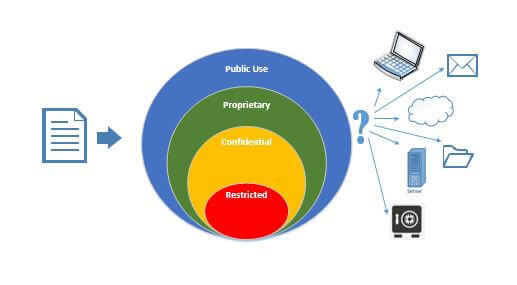
Why is the word ‘inappropriate’ in there? Information workers have to work. Sharing, as we said above, has to be done for the business to function. Sharing happens in the following ways:
- Direct invitation: I.e., one person wants another to see or change data and emails it to them.
- Stored in a location that a person has access to if they need it: Data is on a departmental file share.
- Stored in a location that a person might happen upon: Data is buried seven layers deep on the internal company portal, but a person may click a link and get there.
- Access due to opportunity: Data that is sensitive when compiled but is unsecured in a system. Subsequently, a person finds they can make a report and download it. (As an example, you may be able to enter a new vendor’s payment information, but should you be able to download all vendors’ banking information?)
- Access due to targeting: Data can be accessed by, um, “borrowed” credentials
Which of these are appropriate? The last two are likely not, but any of the above can end up in organizations sharing data with someone without a need to know, by accident or without an awareness of either the sensitivity of the data or the risks involved in the storage medium.
Storage by Classification
Storage risks are a crazy quilt. Who is supposed to have access to this location? Who is supposed to be able to change data at this location? Is this location backed up and how often? What happens to this data (and its backups) in the event of a disaster? Is this location on a cloud system? Can one log in with Single Sign-On (SSO)? How about without a second authentication factor? Could the storage medium be stolen, and if so, how hard would it be for someone to retrieve the data? Is there a firewall involved? If the data is transferred, do all these answers change? IT can probably answer these questions about nearly any system or hard drive in their purview, but IT is not the group deciding if this data being saved is supposed to go on that media.
We described the classifications as a gradient, but a password vault may be stored on a laptop in an unencrypted data store. Doing so keeps the number of folks with access to one…unless the laptop is shared, stolen or misplaced. Alternatively, it may be on a high-availability VPN-accessible file share that requires a PIN to decrypt. This would mean that it’s only available to the people with the PIN but is unlikely to be unavailable in the event of an earthquake.
There are a lot of variables when it comes to how secure the storage medium is and what data should be put where.

The chart displayed above shows potential values for a company’s storage medium security. The company’s information may appear differently. Even with this information, the user may not have enough information to make good decisions on where to store data. The originator may not know who has been given access to a team collaborative space in SharePoint or if “company accessible” means contractors, too. It may simply be overwhelming to the teammate. If we give more details, even more so. How does one train and reinforce how this data should be stored?
A Culture of Correct Storage
One option is to simply ask them. Create a simple survey with five different recognizable storage locations across the top 10 or 15 types of documents down the side and ask them where they would store each one. These could include an electronic copy of their payroll stub, a support site’s password, a process document, notes from a private meeting with the CEO and pre-release product data. Aggregate and anonymize the results, then publish internally with commentary from management – including their picks for the data classification of each document. Encourage managers to discuss this information with teams so that they can go forth and make good decisions.
You can also look for mis-filed data. DLP (Data Loss Prevention) and CASB (Cloud Access Security Broker) tools can hunt down credit card numbers or other sensitive data improperly filed in your environment. Alternatively, several firewall tools can monitor and block connections for restricted data. Just knowing where the issues are allows you to assign just-in-time training for appropriate groups.
Making sure the systems all have a naming convention to make it easy to understand who has access to the data – months or years after the data store was created – will also increase adoption. What made sense to the population in 2015 for naming may not be clever and obvious to the new hires in 2020.
Do User Access Reviews (UAR) to confirm with the managers that they know exactly which of their people have what profile in the CRM, ERP or any other system as well as what that means in that system. Profiles get out of date, or the user moves to new roles without being removed from former roles
Having data classification in the annual information security training is only a part of the battle. While there are some very good training modules and videos available, they may not be specific enough for your environment.
The post ” Data Classification Is Data Storage” appeared first on TripWire
Source:TripWire – Rita Nygren