
Analysis of a Parental Control System
Canopy was advertised to me through my child’s school. The company offers a multi-platform parental control app claiming various abilities to limit and monitor use of protected devices. Access to Canopy is billed monthly and includes a compelling list of features for concerned parents:
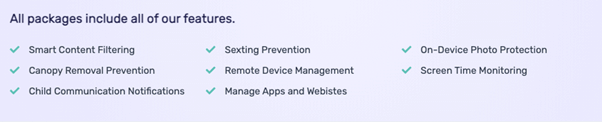
Several of these features imply that the app has privileged access to the protected device and may be intercepting TLS connections to filter content. This privileged access can introduce considerable risk to the security of protected devices and the privacy of the children using those devices.
Where to Begin?
The published Android app provides a starting point for analysis before registering for an account. The app’s apk file can be easily obtained by a Play Store indexing site such as APKPure.
Reviewing the APK
The contents of the APK are easily extracted and converted into smali (a 2GL language for Android). There are several clues in the output about what Canopy is doing.
1. The package name is com.canopy.vpn.filter.parent
a. From this we can infer that it is implementing a VPN connection.
2. The smali recovered from the APK includes TensorFlow/lite
a. This indicates that the product performs some AI (likely image classification) on-device. (This is a good thing for privacy.)
3. The smali recovered includes com.netspark.android
a. A quick Google for NetSpark reveals that they offer VPN filtering technology.
Installing the App
After establishing an account, I proceeded to add monitoring protection to an Android handset. The app provided links for downloading the app as well as help documentation to support installation. The installation process involved authorizing a wide set of permissions including accessibility support, the ability to draw on top of other apps, installing a root CA, and configuring a VPN. The app can also (optionally) act as a device administrator to prevent app removal.
The app installation was not as smooth as it could be. On my test device (up to date Google Pixel 3a), the expected prompts did not work for installing the root CA, and I had to manually find and install it. At the end of this process, the VPN was not properly configured, and I had to reinstall the app. The second attempt to install worked better, and I was able to confirm device content was being inspected:

With protection in place, I attempted to load a blocked site and was greeted with a block page:
The block page has a button allowing the child to request access to the requested page. I sent a request to see how this worked and for good measure, I added a simple message:
<script>alert(document.domain)</script> I went to open the request through the parent web portal, and to my surprise, I was greeted with a JavaScript pop-up.
I decided to deny the request and again insert an XSS payload as explanation text. The protected phone received a notification about the response.
When I opened this notification, I was again greeted with my XSS pop-up.
Exploiting the XSS
The system is failing to sanitize user-inputs leading to cross-site scripting. An attacker (e.g. the monitored kid) can embed an attack payload within an exception request. Although there may be a wide range of ways a clever kid could abuse this vulnerability, the most obvious would be to automatically approve a request. The input field did not seem to have any sanitization and allowed 50 characters, which was plenty to source an external script. My first test was a payload to automatically click to approve the incoming request. This worked well, and I quickly got another payload working to automatically pause monitoring protection.
Finding More XSS
At this point, the child using the protected device could inject arbitrary JavaScript into an authenticated parent session. This could be useful for a variety of child-to-parent attacks including making a self-approving exception request or a request which automatically disables the monitoring software when viewed. This is bad, but it could be worse. This exploitation is noisy – the parent needs to interact with the malicious request and may recognize the attack in progress. (With my payload, the parent can see the buttons being clicked.) In order to see if it is worse, I decided to look a little further at the workflow. When loading a blocked page, the protected device is redirected to a block page.
The url value in that query is displayed on the main page of the parent dashboard, making it a more interesting target for script injection than the request details. I did a quick test of adding a script tag into the URL and loaded up the parent console. While it didn’t trigger my XSS, the page rendering was broken, which let me know to look closer. Looking at the page source code, I could see that the payload was not firing because it was trapped in between quotes. I updated my payload to include “><script>… but the result again did not fire. Another look showed that the HTML now used a single quote. After a few edits, I found that this system could be tricked by combining double and single quotes.
As expected, the JavaScript executed when loading the main page of the parent dashboard. We now can submit an exception request which takes control of the Canopy app when the parent simply logs in to check on the monitored devices.
Bringing it to the Danger Zone
This situation does not bode well for the Canopy parental control system, but at the same time, you may be wondering if this is really a big deal. After all, most kids who are being monitored with this system aren’t going to have a clue about XSS or have access to a parent console to develop an exploit payload. Unfortunately, the attack surface for this vulnerability is quite a bit more substantial than what was discussed earlier with request explanation text. Because this attack involves a crafted URL being blocked, it becomes possible for attacks to come from completely external third-party sources. Anyone who can get a child using the protected device to click a link can now potentially attack the parents monitoring this account. Once the URL has been loaded, the child just needs to be convinced to click the request access button on the resulting block page.
Scarier yet is that the Canopy API design would even allow the external attacker to directly plant a cross-site scripting payload on a parent account by guessing the parent account ID. The account IDs are short numeric values, so it seems quite plausible that an attacker could seed the attack payload on every single parent account by simply issuing a block exception request for each ID value in sequence.
The external attacker may use this to redirect the parent to advertisements, exploits, or other malicious content. Alternatively, an attacker could plant a payload to hijack access to the parental control app and pull GPS coordinates from protected devices on the account. From my perspective, this is a pretty fundamental failure for an app advertising it can keep kids safe online.
What Next?
I reached out to Canopy by phone and by email repeatedly. Ultimately, they produced a fix for the XSS from child to parent but failed to do anything to protect against the parent to child XSS or XSS through the URL of a blocked page request before becoming unresponsive. Canopy needs to implement sanitization of all user-input fields but has failed to do so. After repeated attempts to work with the vendor, we are publishing this report (with some details removed) so that others can learn from it and act accordingly.
The post ” Analysis of a Parental Control System” appeared first on TripWire
Source:TripWire – Craig Young