
Save the Embarrassment: The Value of Two-Factor Authentication on Social Media
These days, it’s not a matter if your password will be breached but when. Major websites experience massive data breaches at an alarming rate. Have I Been Pwned currently has records from 543 sites comprising 11.4 billion accounts. This includes well-known names like Wattpad, MySpace, and Facebook. This is an 84% increase in the number of sites and a 115% increase in the number of accounts from when I published the first version of this article in 2018.
Password breaches are a cause for embarrassment. They are talked about in hushed tones just like finding mice in your home or having your credit card declined. They don’t need to be, though. They are part of the online experience associated with modern cyber life.
Instead of being embarrassed, take steps to minimize the impact that a data breach has on your life.
One of the best ways to do this is to enable two-factor (or multi-factor) authentication on the accounts that you use on a regular basis. Adding a second form of authentication (typically in the fashion of a code generated by or sent to a device you own) can ensure that no one accesses your accounts, even if they have your passwords.
Here you will find step-by-step instructions on how to configure two-factor authentication via your web browser on some of Internet’s biggest social media networks in honor of #SocialMediaDay.
TikTok
- For this app, we’ll use the mobile settings rather than the browser settings. Click on Me at the bottom of the screen followed by the 3 dots at the top on your profile screen.
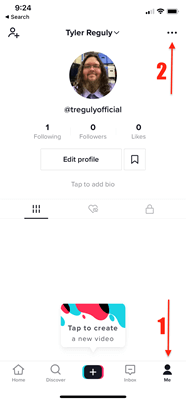
- Select Security and login from the menu that appears

- Select 2-step verification
- Select a method and click Turn on.
- For this app, we’ll once again use the mobile settings rather than the browser settings. Click your profile icon in the bottom right, followed by the three bars in the top right. Then click Settings in the menu that pops up.
- Next, within Settings, select Security.
- Finally, select Two-Factor Authentication and follow the steps to enable it.
- Log in to Twitter, and click on …, More followed by Settings and privacy.
- Under Security and account access, click Security.
- Under Security, click Two-factor authentication.
- Select the method(s) of Two-factor authentication you wish to enable. If you have an authenticator app, it should be given priority over text message; however, text message is better than nothing.
- Log in to Facebook and visit Settings & Privacy by clicking on the top-right menu.
- On the left hand side, select Security and Login, and click Edit next to Use two-factor authentication
- Set up the 2FA methods of your choice. I recommend using an Authentication App, but Text Message is an acceptable fallback.
- Log into LinkedIn and click Me and Settings & Privacy.
- Click Sign in & security in the left hand menu.
- Enable Two-step verification. While the Authenticator app is recommended, phone number (SMS) is an acceptable alternative.
Enabling two-factor authentication is quick and painless in most cases, although it is recommended that you print out back-up codes from sites that support it. These codes can be a life saver when it comes to websites that use authenticator applications should you lose or damage your phone.
I’d like to leave you with one final tip. I’m a big fan of using single sign-on (SSO) with websites. A lot of people question why you would want to use your Facebook, Google, or Apple account to sign into other services. I think there are three answers to that question:
- While this big tech companies may not care about you, they certainly invest more in security than little mom & pop websites. So, why put another password into a potentially less secure service when you can let the credentials of the larger, likely more secure service provide value?
- Not everyone has two-factor authentication. By using SSO, you end up with free two-factor authentication assuming you have enabled it on the service you are using for all of your SSO logins.
- There’s a reason enterprises use SSO. It means fewer passwords to track, fewer accounts to worry about, and an easier way to revoke the credential in the case of a breach.
Are there any websites that you’d like to enable two-factor authentication on that weren’t in the list above? Let us know on Twitter.
The post ” Save the Embarrassment: The Value of Two-Factor Authentication on Social Media” appeared first on TripWire
Source:TripWire – Tyler Reguly