
World Password Day: Using a Passphrase to Strengthen Your Security
Human nature has shown that people re-use passwords, at least for non-work accounts that aren’t requiring quarterly changes. How can it affect your current security that you’ve reused an old password or passphrase from 2012?
Surprisingly, quite a lot.
Hashed passwords and the plain text equivalent from a breached site can be paired with your then-username. Hackers have compiled lists of these pairs in a dictionary. Many sites use your email address as your username, and email addresses don’t change much. So, the hacker has got your email address and some old password.
Hashing algorithms have gotten more secure over the years, and your current bank site likely is using a different hash algorithm for your password than 2016 MySpace or 2012 Dropbox. However, they have already got the dictionary of compiled usernames and previously used passwords – they don’t need to break the security to try the pair and see if it gets them in.
Add a little script, and they can programmatically try all of them on websites they think you have access to in a matter of milliseconds. Or, alternatively, just attempt all the email-used password combinations they have in their dictionary on any site and see if they get lucky.
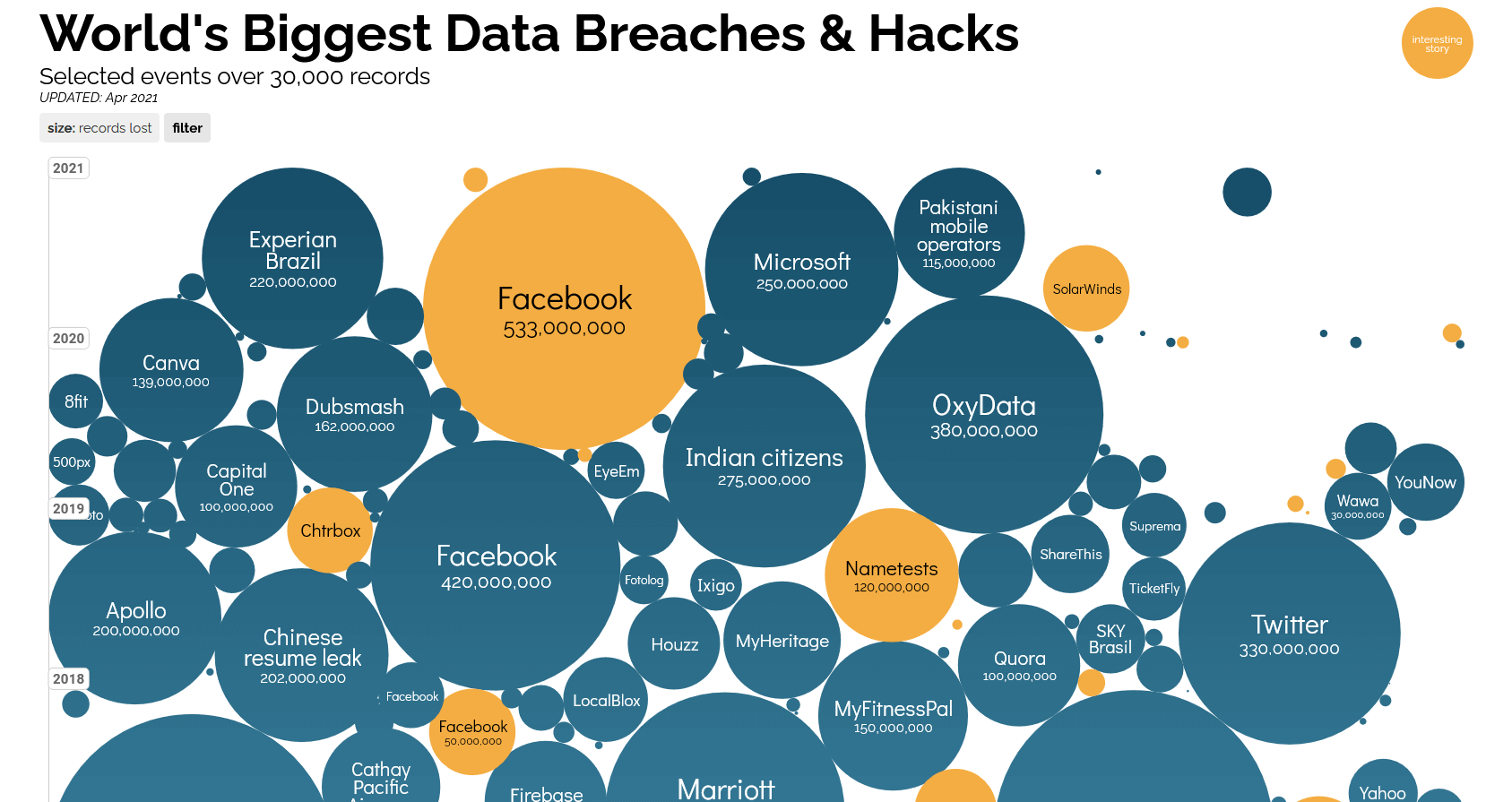
Source: https://www.informationisbeautiful.net/visualizations/worlds-biggest-data-breaches-hacks/
How Do You Foil this Passphrase issue Going Forward?
One way is to never re-use a password. Some systems don’t allow you to reuse a password you’ve used before, but that only works on that individual site for old passwords from that site.
If you’ve reused that AOL password you thought was so easy to remember in 2008 and then forgot about – well, it may still be in the hacker’s dictionary. And after a long online life, do you really remember which passwords you’ve used on all the sites and systems?
NIST used to recommend complex passwords, defining this as a combination of capital and lower case letters, numbers and symbols. However, they have recently retracted this (https://pages.nist.gov/800-63-3/sp800-63b.html) – a short ‘complex’ password is relatively easy for a computerized cracking program to discover.
Longer passphrases, however, exponentially increase the time it would take to break into your account – the computing power isn’t available to do this in less than years or centuries for the better algorithms. Making your passphrase long doesn’t mean it can’t be easy to type – you can just string together a bunch of words (plus a number and symbol, if the site still requires it).
Use a Hash Algorithm
Another means to foil password hackers is to take advantage of the hash algorithm. The algorithm is one-way (you can’t deconstruct it), and another characteristic is that changing a single character completely changes the result in a pretty unpredictable manner. The hashed result for “CorrectHorseBatteryStaple” (https://xkcd.com/936/) is completely different from “CorrectHorseBatteryStable.”
This means for your personal sites where your passphrase doesn’t change often, you can use a long passphrase that isn’t likely in a hacker’s dictionary and preface it with the site name – i.e. “SocialMediaJenny8675309” vs “WellsFargoJenny8675309.” The hash processing will see those as extremely unique and unrelated, but your memory lets you “reuse” your WellsFargo passphrase for Facebook.
Note: Don’t use the above example passphrases, the first lines of your favorite songs or anything from Shakespeare as passphrases. These common examples have all been coded into the hacker dictionaries, and you can count them as cracked. Having said that, the XKCD cartoon referenced above spurred the creation of this generator of random words that may be of use to you: http://correcthorsebatterystaple.net/.
Also, take care as to the prefix/suffix you use for your accounts. Humans are bad at randomizing, and computers are getting good at pattern recognition. If a future breach displays your passphase for one site in plain text, consider if you are giving the hacker enough information to ‘guess’ what your passphrase would be on another site.
Strengthen Further with Use of a Vault
Once you have your unique passphrase for each site, and whether they are either memorable as the above examples or computer-generated random letters, numbers and symbols, do consider using a password vault for storing all your passphases rather than just relying on memory.
Depending on your needs for security vs convenience, you should be able to find the right vault for your situation – the password manager your work provides, or a private one that is local to your computer (but is backed up!) or a family plan that syncs between all your devices and that has multiple accounts for different users. All of these are available in encrypted form, and many are free or a low subscription cost.
Face it, we all have too many sites to remember all the passphrases, and a vault allows you to remember one passphrase and then access all the sites from within it. You do have to consistently remember to update it when a passphrase is updated or a new login is created. Also, I recommended putting the master passphrase for the vault in a sealed envelope in a safety deposit box or physical safe.
MFA to Divide and Not Be Conquered
Multifactor authentication (MFA or 2FA) adds a thing you have to the thing you know to get into your account. Think of it as a backup to your passphrase – if someone does get access to or guess your password, your account will still be safe unless they have access to your authenticating device (ie your phone) as well. If the system has MFA available, do use it for additional security.
Happy World Password Day!
Further Reading:
The War of Passwords: Compliance vs NIST
The post ” World Password Day: Using a Passphrase to Strengthen Your Security” appeared first on TripWire
Source:TripWire – Rita Nygren